
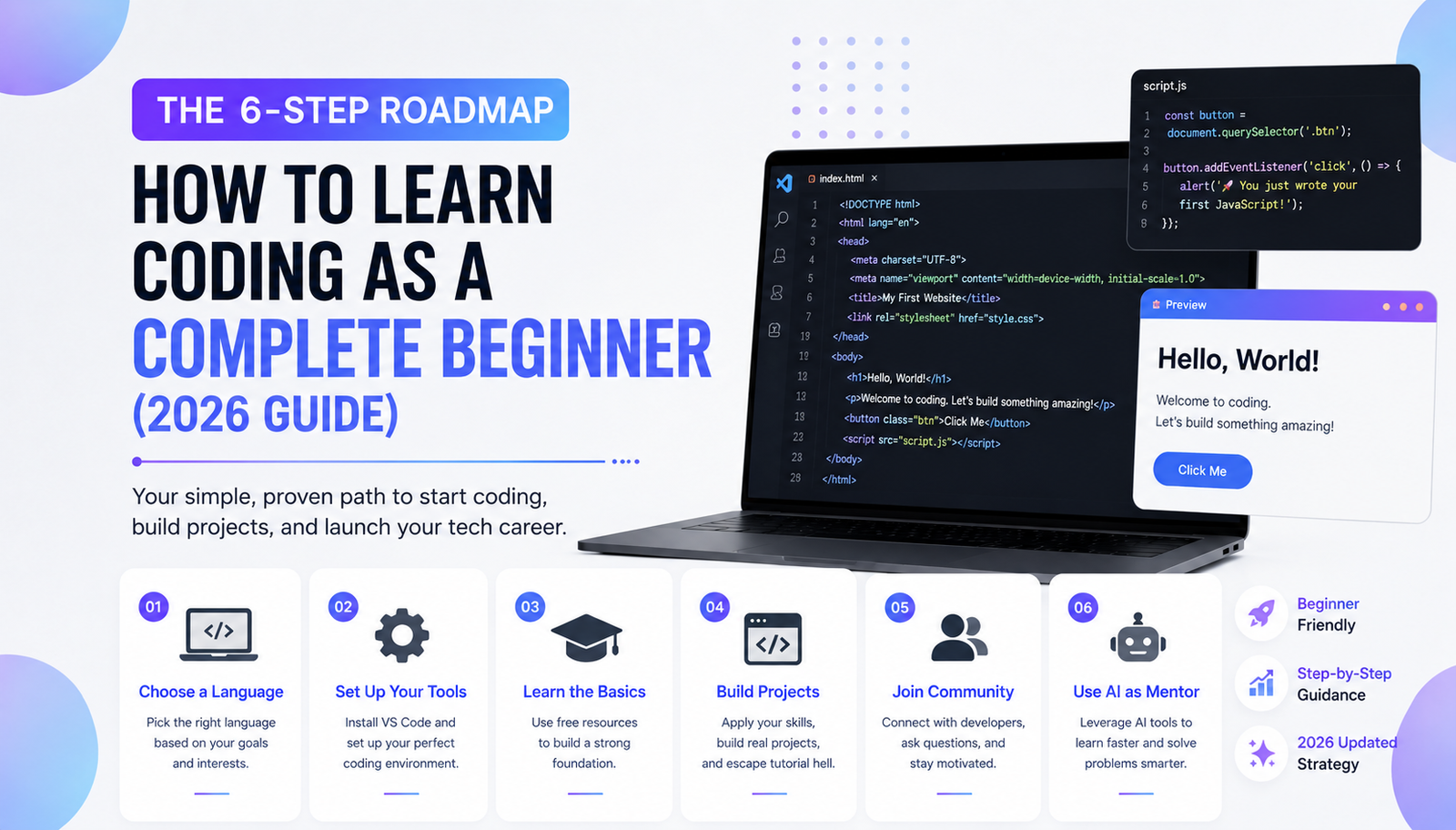
Learning to code can feel like trying to read an alien language. You see screens full of colorful text, complex symbols, and matrix-like numbers. However, the truth is much simpler: coding is just the art of giving a set of clear, logical instructions to a computer.
Whether you want to build the next big mobile app, automate your daily tasks, create a high-traffic blog, or land a high-paying tech job, starting your programming journey in 2026 has never been easier. You do not need to be a math genius, and you certainly do not need a traditional four-year computer science degree. Here is the ultimate, step-by-step guide to learning how to code from scratch.
Step 1: Choose the Right Programming Language for Your Goals
The biggest mistake complete beginners make is trying to learn three different languages at once. Your first language should depend entirely on what you actually want to build. Pick one from the list below and stick with it for at least three months.
- HTML & CSS (For Web Design): If you want to build websites, start here. HTML creates the structure of a webpage (like text, links, and images), and CSS styles it (colors, fonts, and layouts). They are incredibly visual, easy to learn, and give you immediate results.
- JavaScript (For Interactive Websites): Once you know HTML and CSS, JavaScript brings your site to life. It is the engine that makes pop-ups appear, animations run, and interactive web forms work. You cannot be a modern web developer without it.
- Python (For AI, Data, and Automation): If you want to automate boring tasks, analyze data, or dive into Artificial Intelligence, Python is the undisputed king. Its syntax reads almost like plain English, making it the most popular and recommended first language in the world.
- C++ or C# (For Video Game Development): If your dream is to build the next blockbuster PC or console game, these are your tools. C# is the primary language for the Unity game engine, while C++ is the powerhouse behind Unreal Engine.
Step 2: Set Up Your Digital Workspace
You cannot build a house without a toolbox. In the coding world, your toolbox is called an IDE (Integrated Development Environment). It is a specialized text editor designed specifically for writing code.
Do not use basic tools like Notepad. Instead, download Visual Studio Code (VS Code). It is completely free, backed by Microsoft, and used by millions of professional developers. It highlights your code in different colors, auto-completes your sentences, and makes spotting errors incredibly easy.
Step 3: Utilize the Best Free Learning Resources
You do not need to pay thousands of dollars for an expensive coding bootcamp. The internet is filled with world-class, completely free education.
- YouTube: Channels like Programming with Mosh, Traversy Media, and Bro Code offer full 10-hour crash courses for absolute beginners.
- FreeCodeCamp: A massive, interactive platform that takes you from zero to a full-stack developer. You earn free, globally recognized certifications as you complete real-world projects.
- Codecademy: Excellent for interactive, bite-sized lessons where you write code directly in your browser without needing to install complicated software on your computer.
Step 4: The Secret to Escaping “Tutorial Hell”
Watching coding videos is easy; writing your own code from a blank screen is hard. “Tutorial Hell” is a dangerous trap where beginners endlessly watch tutorials without ever building anything by themselves.
To actually learn and retain information, you must apply your knowledge immediately. If you learn how to make a button in HTML, stop the video and build a webpage with five different customized buttons. Start with micro-projects:
- A digital calculator
- A simple To-Do list app
- A random password generator
Step 5: Join a Developer Community

Coding alone in your room can get frustrating. Joining a community keeps you motivated and provides a safety net when your code breaks. Create an account on GitHub to store your code and see what others are building. Use Stack Overflow to search for solutions to your errors (because someone else has definitely made the exact same mistake before). Finally, join coding servers on Discord or Reddit (like r/learnprogramming) to ask questions and network.
Step 6: Leverage AI as Your 24/7 Coding Mentor
In 2026, you have a massive advantage that previous generations did not: Artificial Intelligence.
Instead of searching forums for hours when you get stuck, you can use AI tools like ChatGPT, Claude, or GitHub Copilot. The golden rule is: Do not use AI to write the code for you; use it to explain the code. Prompt it with: “I am a complete beginner. Explain why this Python code is giving me a syntax error, and teach me how to fix it step-by-step.”
Final Thoughts: Consistency is the Ultimate Key
Learning to code is exactly like going to the gym. Coding for 30 minutes every single day is vastly superior to coding for 5 hours once a week. You will encounter errors, and your screen will turn red. Embrace the frustration, take pride in fixing your bugs, and start building your digital future today!