
Struggling to hit your shots? Discover the ultimate step-by-step guide to finding your perfect mouse sensitivity and eDPI for competitive FPS games.
The Ultimate Guide to Finding Your Perfect Sensitivity in FPS Games
There is no better feeling in competitive gaming than dropping 24 kills and securing the MVP title in a sweaty ranked match. However, reaching those high-tier competitive ranks, like Ascendant or Immortal, requires more than just good game sense. It requires absolute mechanical precision. If you are constantly over-flicking your targets or struggling to track moving enemies, your mouse settings are likely holding you back.
A common mistake among beginners is simply copying the exact settings of their favorite esports professionals. But aim is deeply personal. It depends on your mousepad size, your grip style, and your natural wrist mechanics. Here is the ultimate step-by-step guide to finding your perfect sensitivity in FPS games.
1. Understand the Golden Formula: DPI and eDPI
Before you change any in-game sliders, you need to understand the relationship between your hardware and your software.
- DPI (Dots Per Inch): This is the hardware sensitivity of your mouse. The industry standards are usually 400, 800, or 1600 DPI. For modern gaming laptops and high refresh-rate monitors, 800 or 1600 DPI is generally recommended for the smoothest cursor movement.
- eDPI (Effective Dots Per Inch): This is the true metric of your sensitivity. You calculate it by multiplying your mouse DPI by your in-game sensitivity. (For example, 800 DPI x 0.3 in-game = 240 eDPI). Knowing your eDPI is crucial because it allows you to maintain the exact same feel across different shooter games.
2. The PSA (Perfect Sensitivity Approximation) Method
If you are starting from scratch, the PSA method is the most scientific way to find your baseline sensitivity.
- Find Your 360-Degree Turn: Load into an empty custom game. Place your mouse on the far left edge of your mousepad. Move it all the way to the right edge. Adjust your in-game sensitivity until this single, full swipe across your pad results in exactly one 360-degree turn in the game. This is your “Base Sensitivity.”
- Calculate the High and Low: Multiply your Base by 1.5 to get your “High” sensitivity, and divide it by 2 to get your “Low.”
- Test and Eliminate: Go to the practice range and spend 5 minutes shooting bots with both the High and the Low settings. Which one feels more natural? If the High feels better, eliminate the Low.
- Repeat: Take your winning sensitivity, create a new High and Low from it, and test again. By continuously narrowing down the numbers, you will eventually land on a specific decimal that feels perfectly tailored to your hand.
3. Higher Sensitivities and Rhythm Games (osu!)
In tactical shooters, the general advice is to play on a very low sensitivity. However, if you rely heavily on fast flicks or aggressive entry-fragging, transitioning to a higher metric can dramatically improve your reaction time.
Adjusting to a higher configuration can be jarring if you jump straight into a competitive lobby. This is where external tools and rhythm games become incredibly valuable. Games like osu! force you to build intense technical mouse control and micro-correction skills. Playing fast-paced, click-heavy rhythm maps trains your hand to handle higher sensitivities without losing accuracy, building raw mechanical control that directly translates into your FPS performance.
4. Positioning: Wrist vs. Arm Aiming
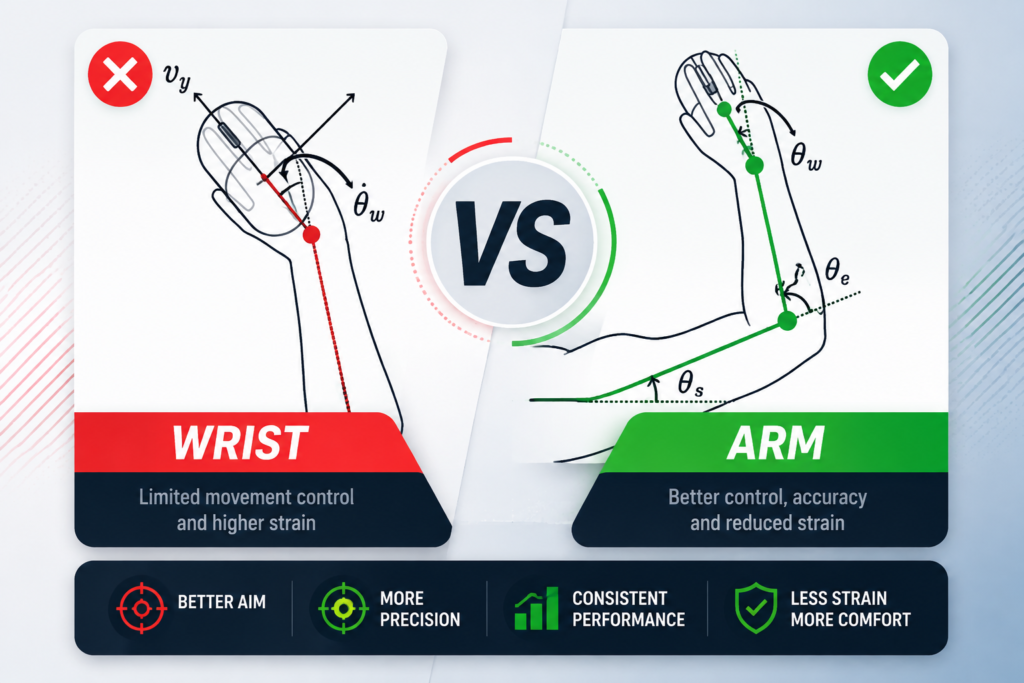
Your ideal sensitivity dictates your physical posture:
- Arm Aiming (Low Sens): Requires a large mousepad. You use your elbow as the pivot point for large movements and your wrist only for micro-adjustments. This is highly consistent and great for holding tight angles.
- Wrist Aiming (High Sens): You plant your wrist on the desk and use small, sharp movements. While it allows for lightning-fast 180-degree turns, it requires a very steady hand to maintain precision.
6. AI-Powered Sensitivity Finders and Aim Analyzers
If manually calculating numbers with the PSA method feels too tedious, you can leverage modern software and AI tools designed to analyze your biomechanics automatically.
- Aim Lab’s AI Sensitivity Finder: Platforms like Aim Lab feature built-in machine learning algorithms that put you through dynamic tracking and flicking scenarios. As you play, the AI detects whether your hand consistently under-aims or overshoots targets, automatically adjusting your in-game sensitivity slider after every round until it finds your physiological sweet spot.
- Oblivity (Dedicated Sensitivity Trainer): Oblivity is a specialized software that runs extensive statistical tests across different mousepad friction levels, monitor refresh rates, and field-of-view (FOV) settings. It generates detailed heatmaps of your hand movement, eliminating the guesswork entirely.
7. Synchronizing Sensitivity Across Multiple Games (FOV Scaling)
One of the biggest pitfalls for competitive players is switching between different game engines. An 800 DPI with a 0.3 sensitivity in Valorant will not feel identical in Counter Strike 2, Overwatch 2, or Call of Duty due to differences in camera engines and Field of View (FOV) rendering.
- Focal Length vs. Viewmodel: Games handle crosshair movement differently depending on whether you are hip-firing or scoping in with a sniper rifle.
- Conversion Calculators: Always use reliable 3D sensitivity converters (such as Mouse-Sensitivity.com or Aiming.Pro). These tools calculate horizontal FOV scaling and uniform soldier aiming, ensuring that moving your mouse 10 centimeters produces the exact same crosshair travel distance regardless of the game you boot up.
8. The Golden Rule: Stop Changing It!

Once you have used the PSA method and refined your aim with trainers or games like osu!, you must commit. Muscle memory takes weeks to fully develop. If you miss a few shots in a match, do not panic and instantly open the settings menu to lower your sensitivity. Trust the process, evaluate your performance over several ranked matches, and let your brain hardwire those new mechanical habits.
Final Thoughts: Lock It In and Build Muscle Memory
Finding your baseline sensitivity through scientific methods, AI analyzers, and converters is only the first step. True mastery comes from neurological adaptation. Once your hardware and software are calibrated to your physical mechanics, stop tweaking the numbers after every bad match. Commit to your configuration, grind your daily routines, and let muscle memory handle the rest.